wireguard-ui的git地址:
https://github.com/ngoduykhanh/wireguard-ui
1、二进制包安装
# 创建 wireguard-ui 工作目录
mkdir -p wireguard-ui

# 下载
wget https://github.com/ngoduykhanh/wireguard-ui/releases/download/v0.4.0/wireguard-ui-v0.4.0-linux-amd64.tar.gz

# 解压
tar -zxvf wireguard-ui-v0.4.0-linux-amd64.tar.gz -C wireguard-ui/

# 进入工作目录
cd wireguard-ui/

# 启动
./wireguard-ui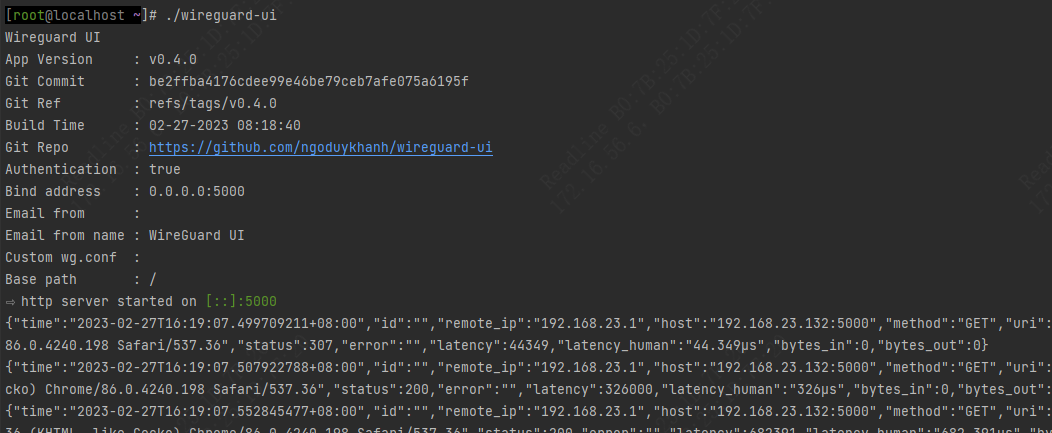
2、配置成服务 和 自动加载 wg 配置
编写 wgui 启动控制脚本:
cd wireguard-ui/
cat << EOF > wgui
#! /bin/sh

#APP_PATH='/data/wwwroot/net.itopcms.com/'
APP_PATH=`echo $(pwd)`
APP_BIN='wireguard-ui'

##切换目录
cd $APP_PATH

case "$1" in
    start)
        echo -n "Starting Service... "

        PID=$(ps -ef | grep "$APP_BIN" | grep -v grep | awk '{print $2}')
        if [ "$PID" != "" ]; then
            echo "Service (pid $PID) already running."
            exit 1
        fi

        setsid "./${APP_BIN}"

        if [ "$?" != 0 ]; then
            echo " failed"
            exit 1
        else
            echo " done"
        fi
        ;;

    status)
        PID=$(ps -ef | grep "$APP_BIN" | grep -v grep | awk '{print $2}')
        if [ "$PID" != "" ]; then
            echo "Service (pid $PID) is running..."
        else
            echo "Service is stopped."
            exit 0
        fi
        ;;

    stop)
        echo -n "Stopping Service... "

        PID=$(ps -ef | grep "$APP_BIN" | grep -v grep | awk '{print $2}')
        if [ "$PID" = "" ]; then
            echo "Serivce is is stopped."
            exit 1
        fi

        kill -9 $PID

        if [ "$?" != 0 ]; then
            echo " failed"
            exit 1
        else
            echo " done"
        fi
        ;;

    restart)
        $0 stop
        sleep 1
        $0 start
        ;;

    *)
        echo "Usage: $0 {start|stop|restart|reload|status}"
        exit 1
        ;;

esac
EOF
编写 /etc/systemd/system/wgui.service:
cd /etc/systemd/system/
cat << EOF > wgui.service
[Unit]
Description=wireguard-ui
After=syslog.target
After=network.target

[Service]
# Modify these two values and uncomment them if you have
# repos with lots of files and get an HTTP error 500 because
# of that
###
#LimitMEMLOCK=infinity
#LimitNOFILE=65535
Type=simple
#User=www
#Group=www
WorkingDirectory=/data/wwwroot/net.itopcms.com
ExecStart=/data/wwwroot/net.itopcms.com/wgui start
ExecStop=/data/wwwroot/net.itopcms.com/wgui stop
ExecReload=/data/wwwroot/net.itopcms.com/wgui restart
Restart=always
#Environment=USER=www HOME=/home/www

# Some distributions may not support these hardening directives. If you cannot start the service due
# to an unknown option, comment out the ones not supported by your version of systemd.
#ProtectSystem=full
PrivateDevices=yes
PrivateTmp=yes
NoNewPrivileges=true

[Install]
WantedBy=multi-user.target
EOF
编写 /etc/systemd/system/wgconfig.service:
cd /etc/systemd/system/
cat << EOF > wgconfig.service
[Unit]
Description=Restart WireGuard
After=network.target

[Service]
Type=oneshot
ExecStart=/usr/bin/systemctl reload wg-quick@wg0.service

[Install]
RequiredBy=wgconfig.path
EOF
编写 /etc/systemd/system/wgconfig.path:
cd /etc/systemd/system/
cat << EOF > wgconfig.path
[Unit]
Description=Watch /etc/wireguard/wg0.conf for changes

[Path]
PathModified=/etc/wireguard/wg0.conf

[Install]
WantedBy=multi-user.target
EOF
配置开机启动
systemctl enable wgconfig.{path,service}
systemctl start wgconfig.{path,service}
作者:admin 创建时间:2023-02-27 15:10
最后编辑:admin 更新时间:2023-03-14 17:41
最后编辑:admin 更新时间:2023-03-14 17:41